


WEEKLY PROGRAMMABLE TIMER
CN101A
The Time Switch is a versatile and feature-rich device
DIN Rail Installation
Advanced pre-setting one week before
Digital electronic time switch with daily programs
Repeat programs with 17 on/off setting;and manual over-ride
Lithium battery power reserve
Auto time error correction ±60sec,weekly
DIN Rail Installation
Advanced pre-setting one week before
Digital electronic time switch with daily programs
Repeat programs with 17 on/off setting;and manual over-ride
Lithium battery power reserve
Auto time error correction ±60sec,weekly
Quantity:
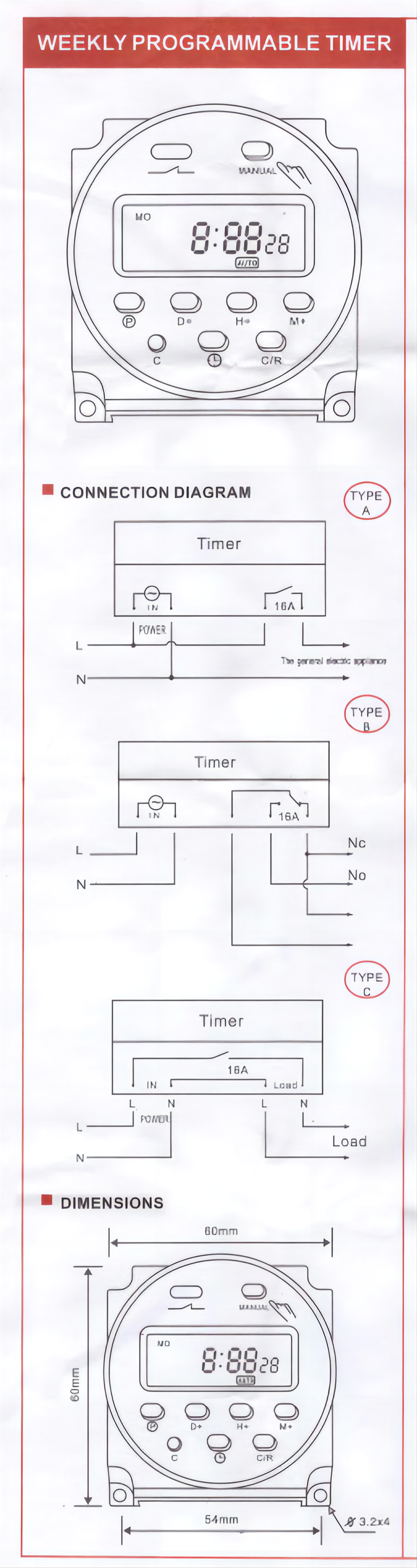
DIN Rail Installation
Advanced pre-setting one week before
Digital electronic time switch with daily programs
Repeat programs with 17 on/off setting;and manual over-ride
Lithium battery power reserve
Auto time error correction ±60sec,weekly
TECHNICAL DATA 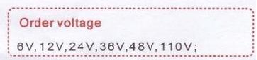 | |||||||||
| Voltage rating:AC220V 50/60Hz | |||||||||
| Voltage limit:AC 180V~250V | Minimum time:1minutes | ||||||||
| Hysteresis:≤1 sec/day (25℃) | Longest time:168Hours | ||||||||
| ON/OFF operation:17 ON &17OFF | Load capacity:resistive load:16A/250VAC | ||||||||
| Power consumption:2VA(max) | Lagging load:10A/250Vac | ||||||||
| Display:LCD | lamp load:2000W | ||||||||
| Service life:Mechanial 10′ | Switching contact:1 changeover switch | ||||||||
| Electrically 10⁵ | Power reserve:3 years (Lithium battery) | ||||||||
| Minimum interval:1 minute | Ambient temperature:-10~+40℃ | ||||||||
| Weight:approx 65g | Ambient humidity:35~85%RH | ||||||||
| DISPLAY | |
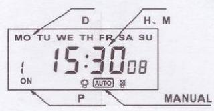
MEANING
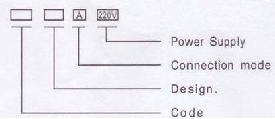
Operating Instrustion:
| 1.To start switch:press reset Key,At the first time,if you want to the present time,please press “O”On board,then press D+,H+,M+to adjust the number to the present time. 2.Enter into programming as belows: | |||||||||
| Step | Key | Programming | |||||||
| 1 | Press P | Setting1 ON time(display 1on) | |||||||
| 2 | Press H+/M+ | Setting hours and minutes | |||||||
| 3 | Press D+ | To select same every day,or different time each day | |||||||
| 4 | Press P | Setting 1 off time(display 1 off) | |||||||
| 5 | Press H+/M+ | Settinghours and minutes turn off time | |||||||
| 6 | Press D+ | If you want the same every day,you need not press this key | |||||||
| 7 | Repeat step2-6 | Set 2-17 on/off time | |||||||
| 8 | Press② | End | |||||||
| If you do not require 17 settings,press"②"to the end. | |||||||||
| NOTE: | |||||||||
| 1.Time setting should according to the time sequence,couldn't be set crossly | |||||||||
| 2.System with quit automatically if there's no operating within 10 seconds and no data is saved. | |||||||||
| 3.Function 3,4,5 can not be used simultaneously. | |||||||||


